

Quickstart
This is the fast, honest path from a clean machine to an agent that is actually talking back. No routes files to hand-write, no secrets to pre-provision, no config to reason about. One command, a browser tab, four short steps in a wizard, and you are chatting. Here is the whole thing in one line:http://127.0.0.1:4000/, and opens your browser to it — even if you have not configured a single provider key yet. Everything else happens in the console.
The rest of this page is the guided tour: what up actually does under the hood, what each wizard step means and why it exists, and where to go once your first agent is live. If you would rather just run the command and poke around, do that — the wizard is self-explanatory and this page will still be here when you want to understand what you built. When you are ready for the production shape of all this, read Production and Security.
What you will have in five minutes
By the end of this quickstart you will have:- a running Kheish daemon that owns durable state on your own disk
- the Kheish Air console open in your browser, served by that same daemon
- one model provider connected, with its key safe in the daemon’s encrypted store
- one working agent, started from a ready-made template, that you are chatting with
- optionally: a tool or two plugged in, a scheduled morning digest, and a first look at memory
The one thing to have ready
kheish-daemon up genuinely boots with nothing configured — that is the whole design. But to get past the first wizard step and actually talk to an agent, you need one real thing: an API key from a model provider. The daemon does not ship a model; it drives yours. So before you start, have a key ready for one of:
- OpenAI — a key that looks like
sk-… - Anthropic — a key that looks like
sk-ant-… - Google — a key that looks like
AIza… - OpenRouter — a key that looks like
sk-or-…(a single account that fronts many models)
Step 0: get the binary
You need thekheish-daemon binary. If you are working from a source checkout, build it once:
kheish-daemon means that binary. If it is on your PATH, use it directly; otherwise call it by path, for example ./target/debug/kheish-daemon up. If you prefer containers, the repository also ships Docker assets, but for a first run the local binary is the shortest path.
The one command: kheish-daemon up
Run it from wherever you want the daemon’s state to live:
Ctrl-C.
That single command does a surprising amount of quiet work so you do not have to. Here is what up sets up:
What each step does, from the original:
- Master key (1): honors one you already provided (env or file), or generates one and writes it to
<state_root>/auth-store-master.keyat chmod 0600; idempotent, so re-running reuses the same key. - Onboarding mode (2): default bind
127.0.0.1:4000(loopback only); default state root.kheish-daemon(created if missing); tolerates zero model routes, booting without a provider key so you can add the key from the console instead of the CLI. - Serve the console (3): one binary hosts both the control-plane API and the console — no separate static host and no CORS to configure.
- Open the browser (4): unless
--no-open, and printsKheish console ready at http://127.0.0.1:4000/.
up exists as a separate command from the lower-level serve.
It generates its own encryption key. The daemon keeps your provider credentials in an encrypted store, and that store needs a master key. Normally you would generate and manage that key yourself. up does it for you on first launch, writes it privately into the state root, and reuses it on every subsequent launch. You never had to know the store existed. (If you do provide a key through the environment or a file, up respects it and does not overwrite anything.)
It boots with no provider key. A normal serve wants at least one resolvable model route before it will start, because a daemon with no way to call a model cannot do much. up deliberately relaxes that: it boots into onboarding mode with an empty route inventory, so the very first thing you do — connecting a model — happens in the friendly console wizard instead of on the command line. Routes you add there go in live, over the API, no restart.
The net effect: up is the zero-configuration front door. serve is the same daemon with the training wheels off, for when you know exactly what routes, auth, and binds you want. We will cover serve near the end, once you have seen what the console does for you.
A note on where things land
up uses these defaults unless you override them:
- Bind:
127.0.0.1:4000— loopback only. Nothing outside your machine can reach it. That is why the console can skip bearer auth on this first run; it is a localhost-only bootstrap, not a posture to copy onto a public server. - State root:
.kheish-daemonin your current directory — the folder that holds the journal, checkpoints, memory, and the encrypted secret store. Back this folder up and you have backed up your daemon.
up from a directory you are happy to keep, or pass --state-root <path> to put the state somewhere deliberate. Reusing a stale state root from an old experiment is the single most common source of “why is this daemon acting weird” — when in doubt, start fresh.
What you see first: the console opens
Your browser lands on Kheish Air athttp://127.0.0.1:4000/. One of two things happens.
If the daemon is up and fresh (which it is, right after up), the console shows the first-launch wizard. It appears because the daemon has no model routes and no operator sessions yet — a clean slate. An existing, already-configured daemon skips the wizard entirely and drops you straight into the console; the tour is only for genuinely fresh setups.
If the console cannot reach a daemon at all — say you opened the URL before the daemon finished booting, or you closed the up terminal — Kheish Air shows a small, friendly panel instead of a blank screen:
kheish-daemon up is running in a terminal, then click Retry. The console is a client; it is only as alive as the daemon it points at.
The first-launch wizard
The wizard is four steps. Only the first is required; the rest are optional and skippable, and you can change everything later. The whole thing is designed so that four quick choices leave you talking to an agent. Every step writes to your real daemon as you go, and “Skip the tour” at any point drops you straight into the console. Let us walk each one.Step 1 — Model (required)
Your agents think with a model, and this step is where you give the daemon a way to call one. It is the only step you cannot skip, for the obvious reason that an agent with no model cannot do anything.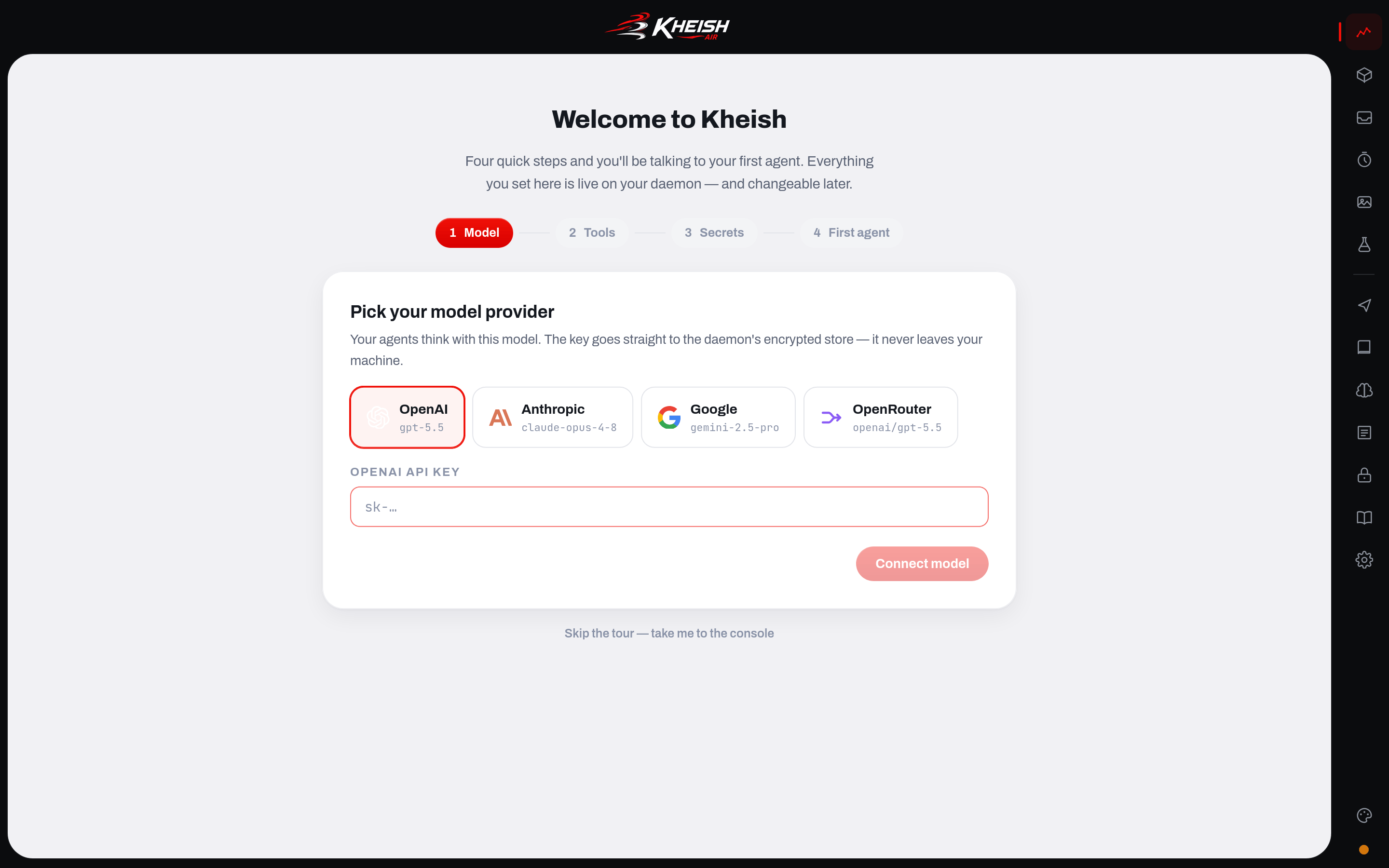
Pick your provider, paste the API key, and click Connect model. That is it.
Two things happen behind that click, and both matter:
- The route goes in live. The console creates a named model route on the running daemon over the control-plane API — no restart, no file editing. The daemon goes from “onboarding mode, zero routes” to “one route, ready to run” in the time it takes the request to return. This is the same live-route mechanism you would use later to add or swap providers on a running production daemon.
- The key goes straight into the encrypted store. As the wizard says plainly: the key goes to the daemon’s encrypted store and never leaves your machine. The console does not keep it, log it, or send it anywhere but the local daemon, which encrypts it at rest. From here on, runs reference the route name, never the raw key. That indirection is the heart of Kheish’s local-first security posture — read Security for the full picture.
Step 2 — Tools (optional)
A model can reason, but on its own it cannot do much — it cannot read your GitHub, check your Linear issues, look something up on the live web. Tools change that. Kheish gives agents capabilities through the Model Context Protocol (MCP): small servers that expose tools an agent can call.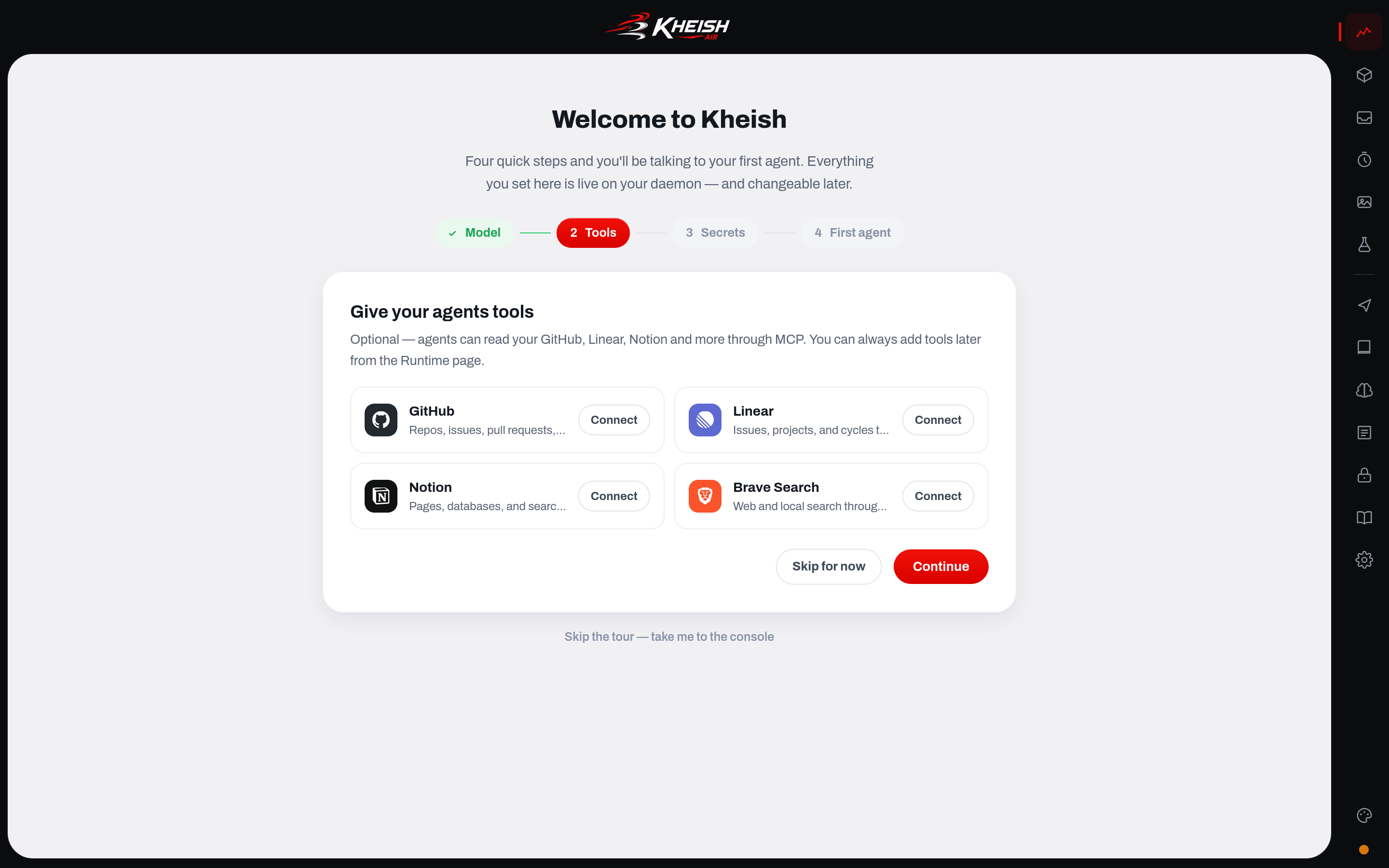
- GitHub — let an agent read repositories, issues, and pull requests
- Linear — read and track issues and projects
- Notion — read and search your workspace
- Brave Search — give the agent live web search
Step 3 — Secrets (optional)
Your agents will often need credentials that are not provider keys and not tied to a specific tool yet — an API token for some service you will wire up later, a webhook signing secret, anything. This step lets you park those in the daemon’s encrypted store now so they are ready when you need them.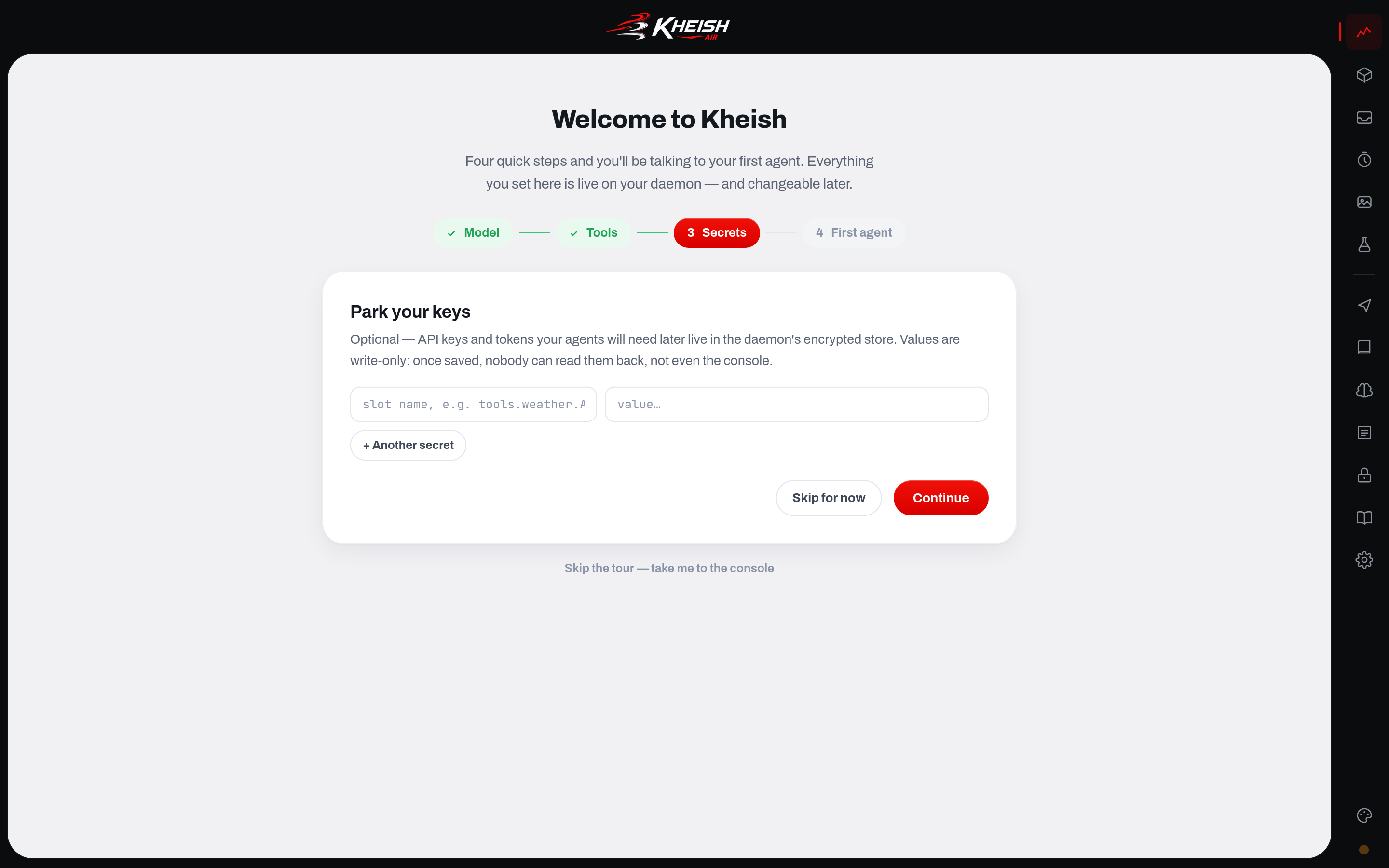
Step 4 — First agent
This is the payoff step. You start from a ready-made agent template, and the moment you pick one it goes live on your daemon and you land in its chat. Three templates are offered:
Click a template and the console does several real things in sequence:
Notice what just happened: you now have a durable persona and a durable session on your daemon, and — if you chose Daily digest — a durable schedule that will wake the agent every morning at 9:00 without you doing anything. These are the same first-class objects the rest of the docs talk about; the wizard just created them for you with sensible defaults. See Agents, personas, and skills for what a persona really is, and Sessions and runs for the session model underneath.
Prefer to build something bespoke instead of using a template? Click Build my own in the playground. That drops you into the console’s playground, where you can craft an agent from scratch — pick a model, write the persona, test prompts — with full control. The templates are the fast start; the playground is the workbench.
Either way, when this step finishes, onboarding is done. The wizard remembers it is complete (locally in your browser) and never nags you again on this daemon.
Chatting with your agent
You land in the session’s chat page. This is a normal conversation surface, but with the daemon’s durability underneath it, so it behaves differently from a stateless chatbot in ways you will come to rely on.- Every message you send submits a direct-input run into this session. The agent has the full session history — everything it and you have said, plus its persona — because the session is durable and shared, not a transcript that lives only in this tab.
- A live event stream keeps the thread current while the agent works. You see it think, call tools, and respond in real time over the daemon’s Server-Sent Events stream, scoped to this session.
- When a run needs you, the chat surfaces it inline. If the agent hits an action that requires a human yes/no, an approval card appears in the thread; if it needs a piece of information to continue, a question card appears. You respond right there, and the run resumes from exactly where it paused. This is the human-in-the-loop governance from the concepts docs, shown at exactly the moment it matters.
Your first real conversation, step by step
Reading about durability is one thing; watching it happen is another. Here is a narrated first conversation with the personal assistant, so you know what to expect and what to notice. Type the messages in bold; the rest describes what the console does. “Introduce yourself in two sentences and tell me what you can do.” The moment you hit send, the console submits a run into the session. You see the agent’s reply stream in token by token over the live event stream — not a spinner that resolves all at once, but the actual generation as it happens. When it finishes, the exchange is written to the session journal. Refresh the page and it is still there, because the transcript lives in the daemon, not the tab. “What did we just talk about?” A trivial question, but it proves the point: the agent answers from the durable session history, not from anything the browser is holding. Open the same session from a second browser tab and ask again — same answer, same history, because there is one session and it belongs to the daemon. Now, if you connected a tool during onboarding, try something that needs it and, ideally, something that would take a gated action: “Check my open GitHub issues and, if there’s a stale one, leave a comment nudging it.” Watch the run reach for the GitHub MCP tool to read your issues — you can see the tool call in the stream. Then it decides to leave a comment, which is an action that writes to the outside world. If that action is gated, the run does not just do it. It suspends, and an approval card appears right in the thread:Building your own agent in the playground
Templates get you talking fast, but eventually you will want an agent that is exactly yours — a specific persona, a specific model, prompts you have tuned. That is what the playground is for. You can reach it from the wizard’s “Build my own in the playground” button, or from the console navigation any time. The playground is a workbench rather than a wizard. In it you can:- pick which model route the agent should think with, and swap it to compare
- write and iterate on the persona — the character and instructions that define the agent’s remit
- send trial inputs and watch the full run unfold, including every tool call, so you can see not just the answer but how the agent got there
- inspect the tool-call log in detail when you are debugging why an agent did or did not reach for a capability
The debrief card
Open the console’s home dashboard (or the session’s own page) and you will find a hero panel titled Latest Run Summary. Until an agent has done enough to summarize, it shows generic stats about recent runs. But there is a Generate action that turns it into something more useful: a humanized debrief — a model-written recap of the agent’s latest runs, in plain language, with the notable bits pulled to the top.The schedules calendar
If you started from the Daily digest template, you already have a schedule. Open the Schedules page to see it. The page has two views:- Calendar — a Google-Calendar-style month view of when your schedules fire. Your 9:00 daily digest shows up as a recurring event. You can click a day to create a new schedule anchored to it.
- List — a table of every schedule with its cadence, target session, status, run count, and last fire time.
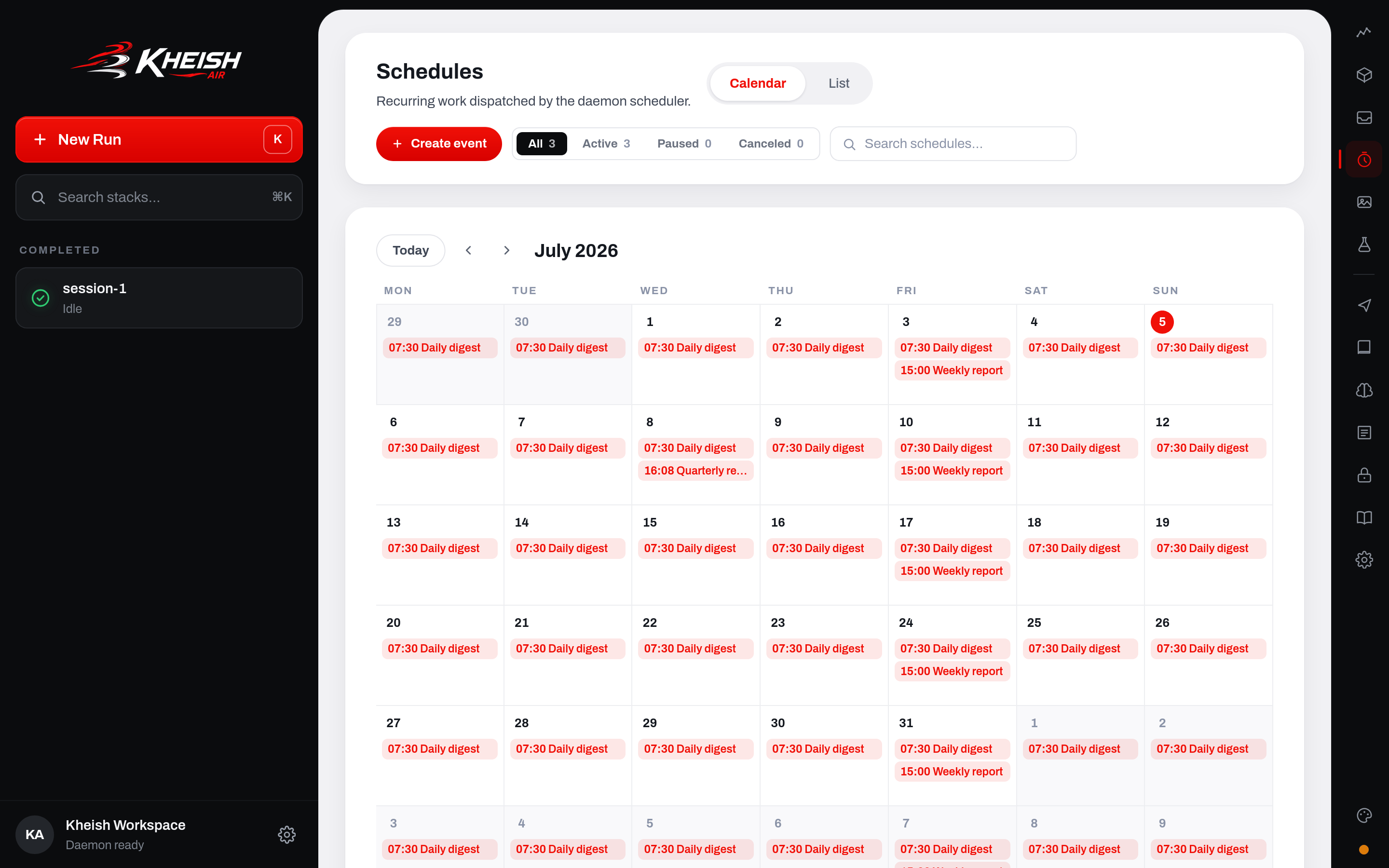
A schedule is a durable trigger owned by the daemon. When it fires, it starts a run in its target session exactly as if you had typed the input yourself — same durability, same journal, same everything. This is how an agent becomes an automation instead of a thing you have to poke: it does its job on a cadence, whether or not any client is open. Read Schedules for the full model, including timezones and retry behavior.
The memory page
Open the Memory page to see the daemon’s durable knowledge plane — the part that makes an agent get better over time instead of starting every run from zero. It has four tabs:- Review — the queue of candidate learnings the daemon has captured from what agents did, waiting for you to publish or reject them. This is the human gate on what becomes durable knowledge.
- Learnings — the published, durable learnings your agents can draw on. You govern this list; nothing becomes long-term memory without passing review (unless you tune the automation to do it for you).
- Skills — reusable procedural skills, including ones promoted from what agents learned by doing.
- Search — search what a specific session can actually remember, so you can see the knowledge from the agent’s point of view.
The rest of the console at a glance
Onboarding dropped you into a chat, but Kheish Air is a full operator surface. You do not need any of these pages on day one — but knowing they exist tells you where to look when a question comes up. Here is the honest one-line purpose of each, so nothing feels like a mystery door.
Making your first agent truly yours
The templates are a fast start, not a ceiling. Here is a concrete, realistic path from “the Daily digest template” to “a morning digest that is actually useful to me,” so you can see how the pieces you met during onboarding compose. Say your agent is the sessiondaily-digest you created in step 4.
1. Sharpen its persona. Open the Library page and edit the persona bound to your digest session. The template’s persona is a good starting character, but you know your context. Tell it what “notable” means for you — which projects, which people, which signals — and how terse you actually want it. The persona is the durable instruction record the agent thinks with; changing it changes every future run, not just the next one. See Agents, personas, and skills.
2. Give it something real to summarize. A digest with no inputs just greets you. On the Runtime page, connect an MCP tool that reaches the systems you care about — your issue tracker, your repositories, your calendar. Now the morning run can pull live state instead of writing from memory alone. If the tool needs a credential you would rather not paste inline, park it as a write-only secret first and reference it. See Tools and MCP.
3. Tune when it fires. On the Schedules page, adjust the cadence. Maybe 9:00 is too early, or you want it only on weekdays. Switch to a custom cron expression like 0 8 * * 1-5 for “8am, Monday through Friday.” The schedule is durable and owned by the daemon, so the change sticks and fires whether or not any browser is open.
4. Let it act, safely. If you want the digest to do things — file a follow-up issue, post to a channel — those actions can be gated behind approvals. The first time the agent tries one, an approval card appears (in the chat, or in the Inbox if you are not watching). You stay in control of anything irreversible while the routine parts run themselves.
5. Read the debrief, not every run. As the agent settles into its routine, stop reading each run and lean on the Latest Run Summary debrief on the dashboard. Hit Generate and get the humanized recap. That glance is the entire point of letting an agent run unattended: you delegate the doing and keep the awareness.
None of those five steps required touching a config file or restarting anything. Persona, tools, secrets, schedule, approvals, debrief — every one is a durable object you adjusted live in the console. That is what “the daemon owns state, everything else talks to it” feels like in your hands: you shape the agent by talking to the daemon, and the changes are real the moment you make them.
What just happened under the hood
You clicked through a friendly wizard, but every click was a real control-plane call. Here is the same onboarding, drawn as what the daemon actually did: Nothing in that diagram is special to onboarding. It is the ordinary way clients drive the daemon: create routes, store secrets, create personas and sessions, submit runs, watch the stream. The wizard is just a particularly nice client for the first five minutes. Once you understand that, the console stops being magic and becomes exactly what it is — the reference client for the control plane you will also drive from SDKs and scripts. See Architecture for how those pieces fit, and SDKs and API for driving the same daemon from your own code.Verify it from the command line
The console is one client; the CLI is another, and it is a great sanity check because it talks to the exact same daemon. If you ever doubt what is really running, ask the daemon directly. In a second terminal (leaveup running in the first):
kheish-daemon runs get <run_id> and kheish-daemon sessions events <session> give you the ground truth.
Two clients, one truth: both read and write the same state, and neither one owns it.
You will not need the CLI for a first agent. But knowing it is there — and that it agrees with the console because they share a daemon — is what makes Kheish feel solid rather than magical. If a run ever gets stuck, the fixed order of evidence is: the session, then its runs, then any pending approvals and questions. All of it is answerable, because all of it is durable.
For a container-first setup
If you would rather not run a bare binary, Kheish ships Docker assets and the same daemon runs happily in a container. The container path trades the one-command convenience ofup for the container boundary and file-backed secrets from the start — a better fit when you are heading toward a real deployment rather than a laptop experiment. The shape is: build the image, generate the master key and an admin token as secret files on the host, bootstrap your provider key into the state volume, then start the container with bearer auth enabled and the control plane bound on loopback.
The container defaults are deliberately stricter than up: bearer auth stays on, and the bind stays on loopback, because a container is a step toward production and should not inherit a laptop’s relaxed posture. The same embedded Kheish Air console is served, so once the container is up you still get the browser experience at http://127.0.0.1:4000/. For the full container topology, secret handling, and probe behavior, follow Production.
For advanced users: the classic serve
up is the zero-config front door. Underneath it is serve, the same daemon with everything explicit and nothing assumed. You will graduate to serve when you want to run a real instance: specific routes, real authentication, a deliberate bind, backed-up secrets. Here is how they relate.
serve is not a different product, it is the same daemon with the conveniences turned off so you can make deliberate choices. The console you met during onboarding is served by serve too — it is embedded in the binary, so any daemon hosts it.
Starting a deliberate daemon
The recommendedserve shape is: choose a named-routes file, populate its secret slots, then start with explicit state and workspace roots. A minimal single-provider example:
up gives you, but with the master key, the route, and the secret slot all under your explicit control — which is what you want for anything beyond a laptop experiment.
The flags that matter most
serve (and up, which accepts all the same flags) has a large surface, but the ones you reach for first are:
A few operational notes that save you pain:
- Authentication and the bind go together. On a loopback bind,
--http-auth-mode autois allowed to run without a token — that is why your firstupon127.0.0.1needed no auth. The daemon refuses to expose a non-loopback bind without an admin token, on purpose. The instant you bind to anything other than loopback, set--http-admin-token. Do not copy the localhost shape onto a public interface. - Routes files are the production path. Named routes with
auth_refslots keep your route ids, credentials, and capability overrides explicit and rotatable. The console’s live-route API is great for getting started and for hot changes; a routes file is how you pin a known-good inventory for a real deployment. - There is a turn ceiling. Agent runs carry a bounded main-loop turn limit (500 by default) so a misconfigured or looping run cannot burn tokens forever. You can raise or remove it with
KHEISH_AGENT_MAX_TURNS, but removing it is an explicit decision the daemon warns loudly about. - Probes are always there.
curl http://127.0.0.1:4000/healthzand.../readyztell you liveness and readiness without auth;/readyzreturns 503 while the daemon is draining during shutdown.
Troubleshooting the first run
A short list of the things that actually go wrong on a first run, and the honest fix for each. The browser did not open.up opens your browser on a best-effort basis (via your platform’s opener). If it did not, just visit http://127.0.0.1:4000/ yourself. The daemon printed the exact URL when it started.
The console says “The runtime is not answering.” The daemon is not reachable. Make sure kheish-daemon up is still running in a terminal (it runs in the foreground; if you closed that terminal, it stopped), then click Retry. If you deliberately run the daemon elsewhere, use the console’s “Point the console at another daemon” link.
Port 4000 is already in use. Something else is on that port — very often an older Kheish daemon you forgot to stop. Stop the other process, or start on a different port with kheish-daemon up --bind 127.0.0.1:4010 and open that URL.
The model step rejects my key. The key goes straight to the provider on the first real call, so a rejected key usually means a typo, a key for the wrong provider, or a key without access to the model shown. Double-check the provider you selected matches the key you pasted.
A tool would not hot-add. Some daemon builds cannot add MCP servers live; the console tells you so. Finish onboarding without it and add the tool later from the Runtime page, or run a daemon that supports live MCP.
I want to start over completely. Stop the daemon and remove its state root (the .kheish-daemon folder by default). The next up is a clean slate — new master key, no routes, the wizard again. Only do this when you actually want to discard everything; the state root is your durable data.
My agent’s run seems stuck or paused. That is usually not a bug — it is a run waiting on an approval or a question. Look in the chat for an approval or question card, or check the session’s runs. Durable suspension looks like “nothing is happening” until you realize the agent is politely waiting for you.
Recap: the mental model you just built
In five minutes you did more than start a chatbot. Trace it back and you built a small but complete Kheish deployment, and every piece of it is a durable object the daemon owns: Everything you touched — the console, the CLI, the wizard — was a client of that daemon. None of them held the truth. That is the one idea the whole system rests on, and now you have felt it rather than just read it: the daemon owns state, and everything else talks to it. The practical upshot for what you do next: you never have to wonder where something lives. A session, a route, a secret, a schedule, a memory — all of it is in the daemon, reachable through the same control plane, whether you get there from the console, the CLI, or code. You are not going to outgrow this setup and rebuild it. You are going to turn on more of what is already there.Frequently asked, honestly answered
Do I have to use the console? No. The console is the fastest way to start and to drive things by hand, but everything it does is a control-plane call you can make from the CLI or an SDK. Many people onboard in the console, then automate with a script. See SDKs and API. Isup safe to run more than once? Yes. It is idempotent about the master key and boots against your existing state root, so re-running it resumes your daemon rather than resetting it. A fresh wizard only appears on a genuinely fresh daemon.
Where did my provider key go? Into the daemon’s encrypted store in the state root, referenced by a route name. It is not in the console, not in a log, and not sent anywhere but your local daemon. That is the local-first design; Security explains it fully.
Can I connect more than one provider? Yes. The Model step lets you add another provider, and you can manage routes anytime from the console’s Runtime page or with a routes file under serve. One becomes the default; sessions can pin a specific route.
What is the difference between up and serve again? up is serve plus onboarding conveniences: it generates the master key, boots with zero routes, prints the console URL, and opens your browser. serve makes all of that explicit for real deployments. Same daemon, same console.
Does the schedule keep firing if I close the browser? Yes — as long as the daemon is running. Schedules are durable triggers owned by the daemon, not the browser. Closing Kheish Air changes nothing; stopping the daemon pauses them until it is back.
My daemon restarted — did I lose my session? No. In-flight sessions and their pending approvals are recovered from the journal on restart. That is the whole point of the daemon owning durable state.
Can I move my daemon to another machine later? Yes. The state root is a portable folder — journals, checkpoints, memory, and the encrypted store, together. Keep it together when you back up or migrate (and keep the master key with it, since the store cannot be decrypted without it). A daemon you run is a daemon you can move.
Do I need to keep the up terminal open? Yes, if you started it in the foreground — the daemon runs in that terminal and stops when you close it (or press Ctrl-C). For anything you want to keep running unattended, run it as a background service or in a container; see Production.
Is the console safe to expose to my team? Not as-is from up. The first-run setup is loopback-only with relaxed auth precisely because it is on your machine. Before anyone else can reach it, you move to a deliberate serve (or container) with bearer auth and a considered bind. Security is the page for that.
How do I add a second agent? Create another session — from the console, or with kheish-daemon sessions create <name> — and bind a persona to it. Each agent is a durable session; you can have as many as you like against one daemon, and they can even coordinate through channels and projects when the work calls for it.
Where to go next
You have a running daemon, a connected model, and a live agent. Here is the natural path onward:- Understand what you built. Architecture shows the subsystems and how a request flows through them, and Sessions and runs is the execution backbone under every chat.
- Give agents lasting knowledge and character. Memory and Agents, personas, and skills.
- Make it run itself. Schedules for cadences, Connectors for letting the outside world start runs, and Tools and MCP for real capabilities.
- Run it for real. Security and Production for hardening, auth, secrets, and deployment.
- Automate from code. SDKs and API to drive the same daemon from your own programs.
- Zoom back out. Why Kheish is the big-picture case for the whole approach, if you skipped it to get here.
kheish-daemon up — is the same command you will run every time you want your agents back. One line, and the daemon takes it from there.