

Schedules, goals, and recurring work
Most agent platforms treat “do this later” as an afterthought: a cron entry on the host, a queue worker somewhere else, a lambda that pokes an API. Kheish takes the opposite stance. The clock lives inside the daemon, next to the sessions and runs it acts on. A schedule can target an existing session, carry the same reply routing as a human message, survive a restart, and be paused, resumed, retriggered, or cancelled through the same control plane you already use for everything else. This page is the practical guide to that machinery. It covers three related but distinct concepts:- Schedules — durable, daemon-owned timers that materialize future runs (one-shot, fixed interval, or cron).
- Session goals — standing objectives that the daemon keeps driving whenever a session goes idle, with pause/resume and token budgets.
- The Kheish Air Schedules calendar — the console surface that compiles plain-words repeats (“every weekday at 9am”) into daemon-native cron, plus the playground bench schedules used to rehearse cadences before they touch production.
The three cadences
Every schedule has exactly one cadence. The cadence is the answer to “when does this fire?” There are three shapes, and they are mutually exclusive.once — a single future instant
A one-shot schedule fires exactly once, at an absolute millisecond timestamp, then completes.
fire_at_ms is greater than zero. A once schedule with a timestamp already in the past is still valid — it becomes due immediately and fires on the next scheduler pass. That is intentional: it lets you enqueue “do this as soon as the worker gets to it” without special-casing now-versus-later.
interval — a fixed gap between fires
An interval schedule fires, waits a fixed number of seconds, fires again, forever (or until max_executions or an explicit stop).
now + every_seconds, not immediately. If you want it to run right away and then settle into the interval, create it and call trigger-now once.
The interval floor is 5 seconds (DEFAULT_SCHEDULE_MIN_INTERVAL_SECONDS). Anything smaller is rejected at creation. This is a deliberate guardrail: sub-second polling belongs to a connector or a streaming source, not to a durable schedule that persists a record and computes a plan on every tick.
cron — calendar-aware recurrence
A cron schedule fires on a calendar pattern, evaluated in a named IANA timezone.
timezone field defaults to "UTC" when omitted. Cron is the only cadence that understands “9am local, every weekday, and please handle the day the clocks change.” It is also the cadence with the most footguns, which is why it gets its own section below.
Cron cadences are validated at creation time by computing the first two fire instants and asserting the gap between them is at least 5 seconds. A cron expression that never fires, fires only once, or fires faster than the floor is rejected before the record is ever stored.
Exactly ONE cadence per schedule. There is no hybrid. If you need “every weekday at 9 AND on the 1st of the month,” that is TWO cron schedules, not one clever expression.
The 6/7-field cron anatomy — and the classic trap
Kheish uses the Rustcron crate (version 0.15) for cron parsing and projection. This is not Unix/Vixie cron. If you paste a five-field crontab line from your server, it will be rejected or — worse — silently mean something you did not intend once you add the missing field. Read this section carefully; it is where almost every “my schedule fired on the wrong day” ticket comes from.
Field count: seconds come first
Thecron crate expects six or seven whitespace-separated fields, in this order:
0 0 * * * * (six fields), not 0 * * * *. And “every five minutes” is 0 */5 * * * *, not */5 * * * * — the latter is a valid six-field expression that means every five seconds, which will be rejected by the 5-second floor only because it happens to sit exactly at the boundary; */2 * * * * * (every two seconds) is rejected outright.
The Sunday-is-1 trap
Here is the single most surprising difference from Unix cron. In thecron crate:
Read that table twice. In Unix cron,
1 means Monday. In Kheish, 1 means Sunday. If you write 0 0 9 * * 1 expecting a Monday 9am job, you will get a Sunday 9am job.
Months are less treacherous but still worth stating: they are 1-12 with January = 1, and named forms (JAN..DEC, JANUARY..DECEMBER) are accepted.
The single, unbreakable rule: use names for weekdays
Because the numeric offset is a trap, the strongest operational recommendation in this entire document is:Always write weekdays by name.Names are unambiguous.MON-FRI,SAT,SUN. Never1-5.
MON-FRI cannot be misread; 1-5 reads as Sunday-through-Thursday under this crate. Every example in this page uses names, and the Kheish Air Schedules calendar (below) compiles plain-words repeats into named-weekday cron for exactly this reason.
A gallery of correct expressions
@-shorthands are supported by the crate and are the safest option when they fit — there is no field to miscount and no weekday number to get wrong.
Timezones and daylight saving
Cron cadences are evaluated in the IANA timezone you name (Europe/Paris, America/New_York, Asia/Tokyo, …), parsed by chrono-tz. An invalid timezone string is rejected at creation. Two DST edge cases are handled deterministically, and both are covered by daemon tests:
- Spring forward (a wall-clock time that does not exist). If your expression names 02:30 and the clocks jump from 02:00 to 03:00 on that date, that instant simply does not occur. Kheish skips the non-existent local time and lands on the next valid occurrence.
- Fall back (a wall-clock time that occurs twice). When the clocks repeat an hour, a
02:30daily job could theoretically fire twice. Kheish coalesces the ambiguous hour to a single due fire rather than double-firing.
0 30 2 * * *.
If precise wall-clock behavior across DST matters to your workload (billing cutoffs, SLA windows), prefer UTC cron or an interval cadence, which never negotiate with a timezone at all.
Overlap policy: what happens when the last fire is still running
A schedule’s cadence decides when a fire becomes due. The overlap policy decides what happens when a fire comes due while a previous execution from the same schedule is still running. This is where recurring schedules earn their keep or quietly pile up work. Because Kheish serializes runs within a single session, a slow scheduled run can easily still be executing when the next tick arrives. The overlap policy is your explicit answer to that race. There are three values.skip (the default)
If an execution is already in flight, drop the new fire on the floor and advance to the next scheduled time. This is the safest default and the right choice for the vast majority of “keep an eye on X” schedules: you never want a backlog, you just want the latest check to have run.
queue_one
If an execution is already in flight, remember one pending fire. When the current execution settles, the queued fire dispatches. If yet another fire comes due while one is already queued, the newest simply replaces nothing — the queue depth is capped at one. This gives you “don’t skip, but don’t stampede either”: at most one execution running plus at most one waiting.
parallel
Dispatch the new fire immediately regardless of what is already running. Multiple executions from the same schedule can be in flight at once. Use this only when the scheduled work is genuinely independent per fire and your downstream (and your provider budget) can absorb concurrency. Remember that runs in the same session still serialize; parallel is most meaningful when each fire targets independent work or the session tolerates queued runs stacking up.
max_executions is checked BEFORE dispatch. If the schedule has no remaining execution slots, even a queued fire is skipped with a recorded reason.
The scheduler tracks in-flight state on the schedule record itself (in_flight_fire_at_ms, in_flight_run_id) and the single pending fire in queued_fire_at_ms. Those fields are visible on the schedule view, so an operator can always see “is this thing currently running, and is something waiting behind it?”
A subtle but important guarantee: trigger-now still respects the overlap policy. Manually triggering a skip schedule while it is already running will not force a second concurrent execution; it queues or drops according to the same rules. Trigger-now is “make it due right now,” not “bypass the safety rails.”
Misfire policy: what happens after downtime
Overlap is about concurrency. Misfire is about catch-up. When the daemon was down (or paused, or simply couldn’t get to a schedule) and one or more scheduled fires were missed, the misfire policy decides how to reconcile the gap when the scheduler comes back.coalesce_once (the default)
However many fires were missed during the outage, run the work once to represent the whole gap, then resume the normal cadence going forward. This is what you want for idempotent “bring things up to date” work: you do not want fifty catch-up runs after a fifty-minute outage of a per-minute schedule; you want one run that reflects “we’re back, do the thing now,” and then normal ticking.
skip_missed
Do not run anything for the missed window. Just advance the next fire to the correct future time and carry on as if the missed occurrences never existed. This is right for time-sensitive work where a late run is worse than a skipped one — a “good morning summary” at 9am is pointless at 2pm; skip it and wait for tomorrow.
Both converge on the same future schedule. They differ only in whether the gap produces one run or zero runs.
The catch-up scan is bounded. A schedule that has been asleep for months does not attempt to compute every missed cron instant since the dawn of time; the planner computes the latest missed fire (for coalesce_once) or simply the next future fire (for skip_missed) without walking an unbounded history. This keeps a long outage from producing a pathological startup scan.
Overlap and misfire compose. After an outage, coalesce_once produces one catch-up fire; if that fire is still running when the next real tick arrives, the overlap policy takes over from there.
The schedule lifecycle
A schedule is a durable record with a status, not a fire-and-forget timer. Its lifecycle is small and explicit.- ACTIVE — the scheduler drives it; fires dispatch runs.
- PAUSED — no fires; remaining time is preserved.
- COMPLETED — reached max_executions, or a
oncefired. Terminal. - CANCELED — operator or agent stopped it permanently. Terminal.
- cancel — move to
canceled, terminal. - pause — move to
paused, preserving how much time was left until the next fire. - resume — move back to
active, recomputing the next fire. - trigger (trigger-now) — make the schedule immediately due, still honoring overlap policy.
- create — the constructor, covered in the API section.
Pause and resume preserve remaining time
Pausing does not throw away where you were in the cadence. When you pause, the daemon recordspaused_remaining_ms — the gap between “now” and the next fire. On resume, the behavior depends on the cadence:
- For
onceandinterval, the next fire is set tonow + paused_remaining_ms. If a per-hour interval had 12 minutes left when you paused, it has 12 minutes left when you resume, no matter how long the pause lasted. - For
cron, resume recomputes the next fire from the calendar pattern relative to now. A cron schedule does not “owe” you a fire for the paused window; it simply rejoins its pattern.
Execution records: the audit trail on every schedule
Each schedule keeps a bounded history of its recent fires — up to 50 records (DEFAULT_SCHEDULE_RECENT_EXECUTION_LIMIT) — right on the schedule view. You do not have to correlate against a separate log to answer “did last night’s run actually go?”
Each execution record carries:
fire_at_ms— the scheduled instant this record represents.run_id— the run that was dispatched, when one was.status— where this fire ended up (see below).attempt— retry attempt count for scheduler-owned dispatch.from_queued_fire— whether this fire came out of thequeue_onebuffer.claimed_at_ms,dispatched_at_ms,settled_at_ms— lifecycle timestamps.retry_after_ms— backoff delay when a dispatch is retrying.error— the failure reason, when there is one.
The top-level schedule view also carries running counters:
execution_count, consecutive_failures, last_fire_at_ms, last_dispatched_run_id, last_error, and scheduler-retry bookkeeping (last_scheduler_error, scheduler_retry_after_ms, scheduler_retry_attempt). When a schedule “goes quiet,” these fields are the first place to look.
Scheduler retry and backoff
Dispatch failures that are the scheduler’s own fault (as opposed to a run that ran and failed) are retried with exponential backoff and deterministic jitter. The defaults:retry_base_delay_ms= 500retry_max_delay_ms= 30000retry_jitter_ms= 250retry_max_attempts= 0 (unlimited — the schedule keeps retrying rather than silently dying)
retry_max_attempts = 0 is a policy choice: a schedule with a transient downstream problem should keep trying, not quietly pause itself after N failures and leave you wondering why nothing fired. If you want a schedule to give up after some number of consecutive dispatch failures, set a non-zero retry_max_attempts in the daemon’s scheduler policy configuration.
What a schedule actually runs: the three payload types
A schedule does not just “fire” — it materializes a specific kind of work. Exactly one of three payloads must be present on a schedule, and this is validated at creation. Sending zero or two payloads is rejected with “schedule request must define exactly one payload.”1. request — a normal input run
The everyday case. The schedule submits an input to the target session, exactly as if a human or connector had sent it. This is a full SubmitInputRequest: content, input items, attachments, generation overrides, completion requirements, reply targets, and metadata.
2. observation_materialization — turn a captured observation into a run
For the capture/observation subsystem: a schedule can periodically materialize a stored observation into a concrete run. The target_session_id on the materialization must match the schedule’s target_session_id; a mismatch is rejected.
3. flow_start — kick off a playbook Flow
A schedule can start a durable playbook Flow on each fire. The session_id inside the flow-start must match the schedule’s target session.
Recurring Flows have a special rule worth calling out. A one-shot (once) flow schedule may pin an explicit flow_id and idempotency_key. A recurring flow schedule may not — because every fire needs its own unique flow identity. Kheish derives a deterministic per-fire id and idempotency key for recurring flow schedules:
flow_id on a recurring flow schedule is rejected with a clear message: “flow_start.flow_id is only supported for one-shot schedules; recurring scheduled Flows derive a unique flow_id per fire.”
What the daemon stamps onto every scheduled run
No matter which payload type fires, the daemon normalizes provenance so scheduled work is never mistaken for user or connector traffic and cannot be spoofed by the payload:source_pluginis forced to"scheduler".source_kindbecomesscheduled_input,scheduled_flow_start, orscheduled_observation_materializationdepending on the payload.actor_idis set to theschedule_id.metadatagainsschedule_idandscheduled_for_ms(the intended fire instant).
Ownership, limits, and the definition digest
Schedules can name an owner (owner_session_id, owner_agent_id) separate from their target (target_session_id, target_agent_id). Owner is “who is responsible for this schedule”; target is “where the work lands.” An agent scheduling work for itself has owner and target pointing at the same session; a coordinator scheduling work for a worker session has them differ.
One guardrail rides on ownership: an owner session may hold at most 128 active schedules (DEFAULT_MAX_OWNER_SCHEDULES). Creating the 129th active schedule for one owner is rejected. This keeps a runaway agent from carpet-bombing the scheduler with thousands of timers. Paused, completed, and cancelled schedules do not count against the active limit.
Every schedule also carries a definition digest — a SHA-256 over the schedule’s meaningful definition (name, target, cadence, max executions, overlap and misfire policy, and the canonicalized payload). Volatile provenance fields (source_plugin, source_kind, actor_id) are stripped before hashing so they do not perturb the digest. The digest lets tooling detect “is this the same schedule definition I created, or did something change it?” without diffing the whole record.
The API surface
Schedules are managed through a small, regular REST surface. The base type for the create body is the sameScheduleCreateRequest used internally, so what you POST is exactly what gets stored.
Create a one-shot reminder
201 Created carrying the full schedule view, including its generated schedule_id, computed next_fire_at_ms, and empty execution history.
Create a weekday-morning cron schedule
skip_missed case (a late brief is useless) with skip overlap (never stack briefs). And the weekday is written MON-FRI, never 1-5.
Create a rate-limited interval poller with a cap
max_executions: 24 makes this a “run hourly for a day, then complete” schedule. queue_one means a slow sweep never causes the next one to be silently dropped — it waits. coalesce_once means a brief daemon blip produces a single catch-up sweep, not a backlog.
Manage a schedule
The CLI equivalent
The bundled CLI mirrors the API for operators who live in a terminal:--overlap-policy accepts skip, queue-one, parallel, and --misfire-policy accepts coalesce-once, skip-missed — the same set as the API and the model-facing tools, just spelled for the argument parser.
Agent-created schedules: the in-run tools
An agent does not need an operator to schedule work — it can schedule from inside a run using control tools. This is how a running agent says “wake me in an hour” or “check this every weekday morning” without leaving the loop.wake_after— fire a follow-up after a relative delay.wake_at— fire a follow-up at an absolute RFC3339 timestamp (a one-shotonceschedule under the hood).schedule_create— the full constructor: exactly one ofat,every_seconds, orcron, plusoverlap_policy,misfire_policy,max_executions, and generation overrides.schedule_list,schedule_get— read schedules owned by the current session.schedule_cancel,schedule_pause,schedule_resume,schedule_trigger_now— manage them.
self— schedule work back into the current agent’s own session (the default).parent— schedule work into the parent agent’s session (for sidechains reporting up).session— the current session explicitly (may only target the current session).agent— the current agent or its direct parent.
target=session may only name the current session, and target=agent may only name the current agent or its parent. An agent cannot schedule work into an arbitrary stranger’s session. The provenance stamping described earlier means these agent-initiated schedules are still tagged source_plugin: "scheduler" and carry the schedule id as actor_id, so they are auditable like any other scheduled work.
A worked example, described in plain terms: an agent finishing a long research task calls schedule_create with cron: "0 0 8 * * MON", target: "self", and a message “Re-run the competitive scan and diff against last week.” From then on, every Monday at 8am the daemon submits that input back into the same session, the agent picks up its own prior context, and the loop continues with zero human involvement. If the agent later decides the cadence is wrong, it calls schedule_get to find the id and schedule_pause or schedule_cancel to stop it.
Session goals: standing objectives, not one-off fires
Schedules answer “do this at these times.” Session goals answer a different question: “keep working toward this until it’s done.” A goal is a durable objective attached to a session that the daemon keeps driving forward whenever the session goes idle — a continuation engine, not a clock. A session has at most one goal at a time. The goal is stored in session metadata and survives restart like everything else.Goal anatomy
ASessionGoal carries:
objective— the standing instruction, up to 8000 characters. Empty objectives are rejected.status— the lifecycle state (see below).token_budget— an optional token ceiling (must be greater than zero when set).tokens_used,time_used_ms— accumulated, idempotently accounted usage.version— a monotonic counter bumped on any change, including usage accounting.definition_version— a monotonic counter bumped only on definitional changes (objective, status, budget), excluding pure usage accounting.created_by_run_id,last_continuation_run_id,budget_limited_by_run_id,budget_wrapup_run_id,completed_by_run_id— the run-correlation bookkeeping.
version and definition_version is subtle and important. Every time the daemon accounts tokens against the goal, version ticks — but the definition has not changed, so definition_version holds steady. This lets the daemon bind a continuation run to a specific goal definition using compare-and-set semantics, without a background accounting update spuriously invalidating that binding. When you edit the objective, budget, or status, definition_version bumps and any in-flight continuation bound to the old definition is safely rejected.
Goal lifecycle
- ACTIVE — daemon drives it when the session is idle.
- PAUSED — user or system halted auto-continuation.
- BUDGET_LIMITED — hit the token ceiling; allowed ONE wrap-up, then no further auto-continuation.
- COMPLETE — explicitly marked achieved.
active goal is auto-continued by the daemon. paused and complete do not auto-continue. budget_limited is special: it is a terminal-ish state that still permits exactly one wrap-up continuation, so the agent can gracefully summarize and stop rather than being cut off mid-thought.
Token budgets and how usage is charged
When you set atoken_budget, the daemon charges non-cached input-plus-output tokens against the goal as runs complete, using an idempotency ledger keyed by run so the same run’s usage is never double-counted. When tokens_used crosses the budget, the goal moves to budget_limited, records which run tripped it (budget_limited_by_run_id), and permits a single wrap-up run.
This is a soft governor, not a hard interrupt: a run already in flight is not killed mid-execution when the budget is crossed. The budget is checked at accounting time, so the effect is “stop starting new continuations once we’re over budget, but let the current one finish and give it one clean wrap-up.” For hard, real-time cost ceilings, pair the goal budget with provider-level or run-level limits.
Pause, resume, and safe editing
Pausing a goal is a status change topaused; the daemon stops driving continuations but leaves the objective intact. Resuming flips it back to active. Because goal mutations use compare-and-set on goal_id plus version (or definition_version), concurrent edits are safe: a stale update that expected an older version is rejected rather than clobbering a newer one. If you complete a goal from a run that queued before the objective was edited, the daemon still accepts a completion bound to the correct definition version; a completion bound to a superseded definition is rejected.
When to use a goal versus a schedule
They are complementary, and the distinction is worth internalizing:
The two combine well. A schedule can create or refresh a goal (“every Monday, set this week’s objective”), and a goal drives the in-between idle work. A common pattern: a weekly cron schedule sets a fresh objective as the week’s goal; the goal engine grinds through it during idle time; a Friday cron schedule marks it complete and archives the outcome.
Kheish Air: the Schedules calendar
Everything above is expressible as JSON and cron strings. Most humans do not want to hand-write0 0 9 * * MON-FRI and reason about Sunday-is-1. The Kheish Air console provides a Schedules page built around a familiar month calendar, and it exists precisely to keep you away from the cron footguns.
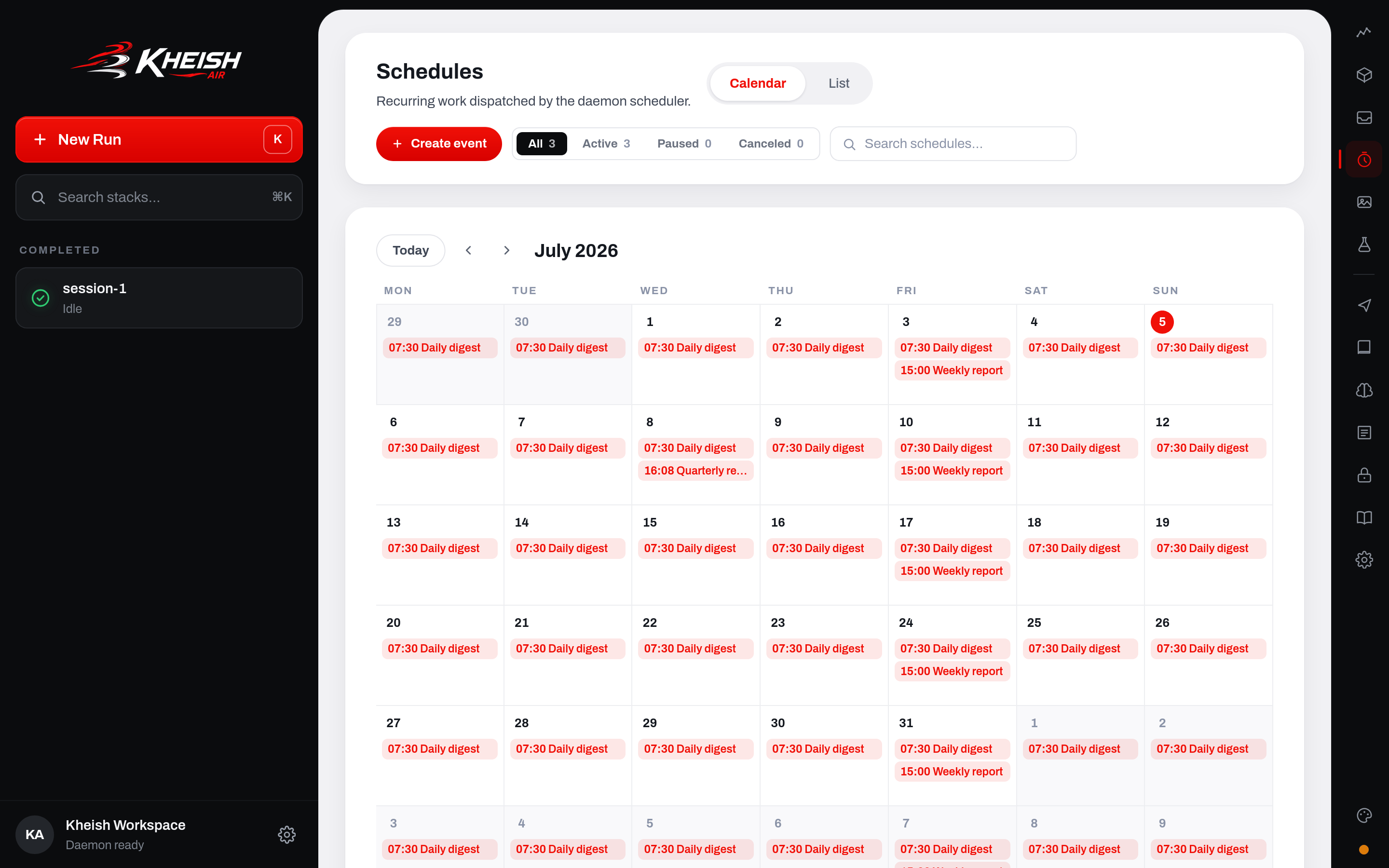
Plain-words repeats compile to daemon-native cron
When you create an event on the calendar, you describe the repeat in plain words — “every weekday at 9am,” “the first Monday of every month,” “every 15 minutes during business hours” — and Air compiles that into a daemon-native cron expression with named weekdays. You never type1-5; you pick “weekdays,” and Air emits 0 0 9 * * MON-FRI for the actual schedule. The compilation is deliberately one-directional and conservative: it only emits expressions the daemon will accept, and it uses named weekdays so the stored cron reads correctly and survives a round-trip through the API.
This matters because the calendar is a projection of the real schedule, not a separate abstraction. The month grid you see is Air asking the same cadence math the daemon uses “when would this fire across this month?” and drawing a mark on each day. What you preview is what will run. If your plain-words repeat would produce a surprising pattern (say, you accidentally asked for “Sundays” thinking it was Mondays), the grid shows it immediately — the marks land on the wrong column and you catch it before saving.
The month projection as a safety net
The calendar projection is the antidote to the Sunday-is-1 trap for people who never learn the trap exists. Because Air draws where fires actually land, a mistake is visible geometrically rather than requiring you to mentally evaluate a cron string. Operators consistently catch “wrong weekday” and “wrong week-of-month” errors just by glancing at the grid. Treat the projection as a required review step: create the event, look at the marks, confirm they fall where you expect, then save.Playground bench schedules
The Air playground includes bench schedules — a rehearsal space for cadences. Before you commit a cron pattern to a production session, you can stand it up against a bench (a throwaway session) and let it fire on an accelerated or observed basis to confirm the timing, the overlap behavior, and the shape of the run it produces. The bench is where you answer “doesqueue_one do what I think when the run is slow?” without risking a real workload. Once the cadence and policies behave, you promote the same definition to the real target session.
The Runtime and Inbox pages of Air complete the picture: Runtime is where connectors and sidecars are configured (covered in Connectors: where your agents live), and Inbox is where the runs those schedules produce show up for review. A schedule fires, a run lands, and it appears in Inbox with the scheduled_for_ms and schedule_id metadata intact so you can trace it straight back to the calendar event that caused it.
Operator playbooks
Concrete, end-to-end recipes for the situations operators actually hit.Playbook: a reliable daily digest that never spams
Goal: one summary at 07:00 local, every day, that skips if the daemon was down and never stacks up.- Cadence:
cron,0 0 7 * * *, your local IANA timezone. - Overlap:
skip— you never want two digests at once. - Misfire:
skip_missed— a 10am digest is worse than none. - Payload: a
requestwhose content instructs the digest. - Create it in Air off the calendar (pick “every day at 7am”), confirm the grid shows a mark on every day, and save.
Playbook: hourly reconciliation that must not lose a cycle
Goal: reconcile an external system every hour, tolerate slow runs, catch up after downtime.- Cadence:
interval,every_seconds: 3600. - Overlap:
queue_one— if a reconciliation runs long, the next one waits rather than being dropped. - Misfire:
coalesce_once— after an outage, do exactly one catch-up. - Consider
max_executionsonly if this is a bounded campaign; otherwise leave it open.
consecutive_failures and last_scheduler_error on the schedule view. Because retry_max_attempts defaults to unlimited, a persistent downstream outage will show up as a climbing failure count and repeated retrying execution records, not as a schedule that silently paused itself.
Playbook: a bounded campaign
Goal: run a task every 15 minutes, but only 20 times, then stop cleanly.- Cadence:
interval,every_seconds: 900. max_executions: 20.- Overlap:
skip(orqueue_oneif each run matters).
completed on its own. No cleanup cron, no external counter — the daemon owns the count.
Playbook: standing objective with a cost ceiling
Goal: “keep improving the test coverage of module X until it hits 80% or we’ve spent 2M tokens.”- Create a session goal on the working session with the objective text and
token_budget: 2000000. - Leave it
active. The daemon drives continuations during idle time. - When coverage hits 80%, mark the goal
complete(from the agent via its goal tool, or via the control plane). - If the budget is hit first, the goal moves to
budget_limited, gets one wrap-up run to summarize where it landed, and stops.
Failure modes and how they present
Restart and durability
Schedules are stored on disk under the daemon state root, one JSON file per schedule (schedules/<schedule_id>.json), written atomically. On boot the daemon reloads every schedule, recomputes due state against the current time, and resumes the scheduler loop. Corrupt schedule files are quarantined (renamed with a .corrupt-… suffix) rather than crashing the load, and the id-seed logic still accounts for quarantined files so a new schedule cannot reuse a quarantined id.
This is why “put the clock in the daemon” is more than a convenience. A host cron entry evaporates when the box reboots and knows nothing about whether the work it triggers actually completed. A Kheish schedule is a durable record with an execution history, an overlap policy that understands in-flight runs, and a misfire policy that reconciles downtime — all of it persisted, all of it inspectable, all of it recovered on restart.
For the broader durability and recovery story — how runs, sessions, and delivery survive crashes — read Architecture and Sessions and runs.
FAQ
Can one schedule have two cadences (e.g., “weekdays at 9 AND the 1st of the month”)? No. A schedule has exactly one cadence. Create two cron schedules. This keeps each schedule’s projection, overlap, and misfire behavior unambiguous. Why is1 Sunday? That’s not how my server’s crontab works.
Kheish uses the Rust cron crate, whose day-of-week is 1-7 with Sunday = 1. Standard Vixie cron uses 0-6 with Sunday = 0. They disagree. Always use names (MON, SUN) and the disagreement never bites you.
Do I have to include the seconds field?
Yes. The cron crate is six-field minimum (seconds first), seven with an optional trailing year. “Every hour on the hour” is 0 0 * * * *.
What’s the smallest interval I can schedule?
Five seconds, for both interval and cron cadences. Faster recurrence should come from a connector or a streaming input, not a durable schedule.
If the daemon is down for an hour, what happens to my per-minute schedule?
With coalesce_once (default), one catch-up run when it comes back, then normal ticking. With skip_missed, no catch-up, just resume at the next future tick.
Does trigger-now bypass the overlap policy?
No. Trigger-now makes the schedule immediately due; the overlap policy still decides whether it dispatches, queues, or is skipped relative to any in-flight execution.
How do I tell a scheduled run apart from a human message?
Its source_plugin is "scheduler", its source_kind is one of the scheduled_* kinds, its actor_id is the schedule id, and its metadata carries schedule_id and scheduled_for_ms. The payload cannot spoof these — the daemon stamps them.
Can a paused schedule lose its place in the cadence?
For once/interval, no — the remaining time is preserved and the clock resumes where it left off. For cron, resume rejoins the calendar pattern from now rather than replaying the paused window.
What’s the difference between a schedule and a goal, one more time?
A schedule fires discrete runs on a clock. A goal is a standing objective the daemon keeps driving during idle time until it’s complete, paused, or out of budget. Schedules are about when; goals are about until.
Can a schedule create or update a goal?
Yes — a schedule’s request payload can instruct the target session to set or refresh its goal. This is the standard pattern for cyclical objectives (a weekly schedule that sets the week’s goal).
Where do scheduled runs show up for review?
In the Kheish Air Inbox, tagged with the schedule id and intended fire time, so you can trace any run back to the calendar event that produced it.
Related reading
- Connectors: where your agents live — the transports that deliver the runs your schedules produce.
- Tools and MCP — the in-run tools an agent uses to create and manage its own schedules and goals.
- Sessions and runs — why runs serialize per session, which is what makes overlap policy meaningful.
- Architecture — where the scheduler sits relative to the rest of the daemon.
- Tasks and schedules — the concept-level view of schedules alongside session and project tasks.
- Connectors and reply targets — how a scheduled run decides where its output goes.
- Output routing — the delivery side of scheduled work.
- Security — auth and hardening for the control plane that manages all of this.